中文 / 日本語
SGX808 IPsec 外部规格书
$Date: 2015/02/04 10:11:28 $
1. 概要
本文档中记述了SGX808的IPsec功能。
2. 限制条件
本功能设置了下述限制条件。
IKE(Internet Key Exchange)仅支持Version 1。
IKE使用的群仅支持modp1024。
仅作为initiator运行。
仅支持隧道模式。
3. 支持的机型和固件版本
SGX808通过下述固件使用IPsec功能。
机型
固件
修订内容
SGX808
Rev.1.00.03及更高版本
-
Rev.1.00.08及更高版本
・可以执行2个会话。
4. 详细
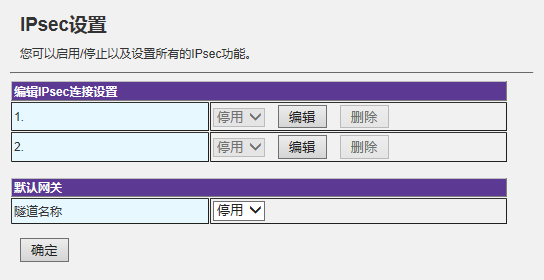
在Web设置画面的Network选项卡内[网络设置]-[IPsec]页面上,设置IPsec功能。
4.1. IPsec的有效和无效
编辑IPsec连接设置(Edit IPsec connection settings)
可以对每个连接信息分别设置"启用"/"停用"。
默认网关(Default Gateway)
从下拉菜单中选择隧道名称,设置作为默认路由的隧道。
编辑(Edit)按钮
进入个别连接信息设置画面。
删除(Delete)按钮
删除个别连接信息。
4.2. 设置连接信息
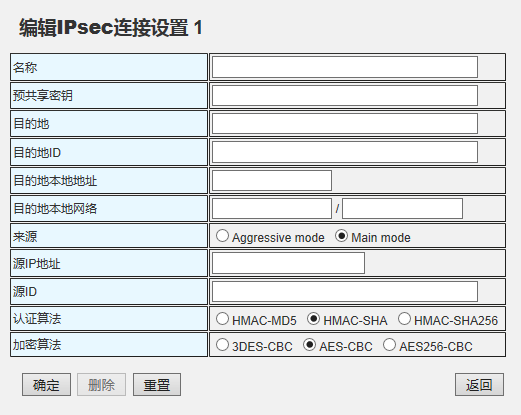
可以对2处连接目标,分别设置下述信息。
名称(Name)
设置IPsec会话的名称。不可省略。
'"'(双引号)、'='(等号)、'#'(井号)、' '(空白)
预共享密钥(Pre-Shared-Key)
IPsec使用密钥转换协议IKE(Internet Key Exchange)。不可省略。
目的地(Destination)
输入目的地信息(IP地址或FQDN)。不可省略。
'"'(双引号)、'='(等号)、'#'(井号)、' '(空白)
目的地ID(Destination ID)
设置目的地的ID。可省略。
'"'(双引号)、'='(等号)、'#'(井号)、' '(空白)
目的地本地地址(Destination Local IP Address)
设置目的地的本地IP地址。不可省略。
目的地本地网络(Destination Local Network)
设置目的地的本地网络地址和子网掩码地址。不可省略。
来源(Source)
选择连接模式。
源IP地址(Source IP Address)
设置本机WAN端的IP地址。不可省略。
源ID(Source ID)
设置IKE的阶段2中使用的自己一方的ID。不可省略。
禁止使用下述字符。
'"'(双引号)、'='(等号)、'#'(井号)、' '(空白)
认证算法(Authentication Algorithm)
从下述3项中选择认证算法。
加密算法(Encryption Algorithm)
从下述3项中选择加密算法。
"确定"按钮
存储设置的信息,返回之前的画面。4.1. IPsec的有效和无效 )为"启用"时,根据设置内容开始运行。设为"停用"时,虽然存储设置内容,但不会开始运行。
"删除"按钮
删除设置的信息,返回之前的画面。
"重置"按钮
把输入中的设置信息,返回到按下"确定"按钮之前的状态。
"返回"按钮
返回之前的画面。废弃输入中的信息。
4.3. 状态参考
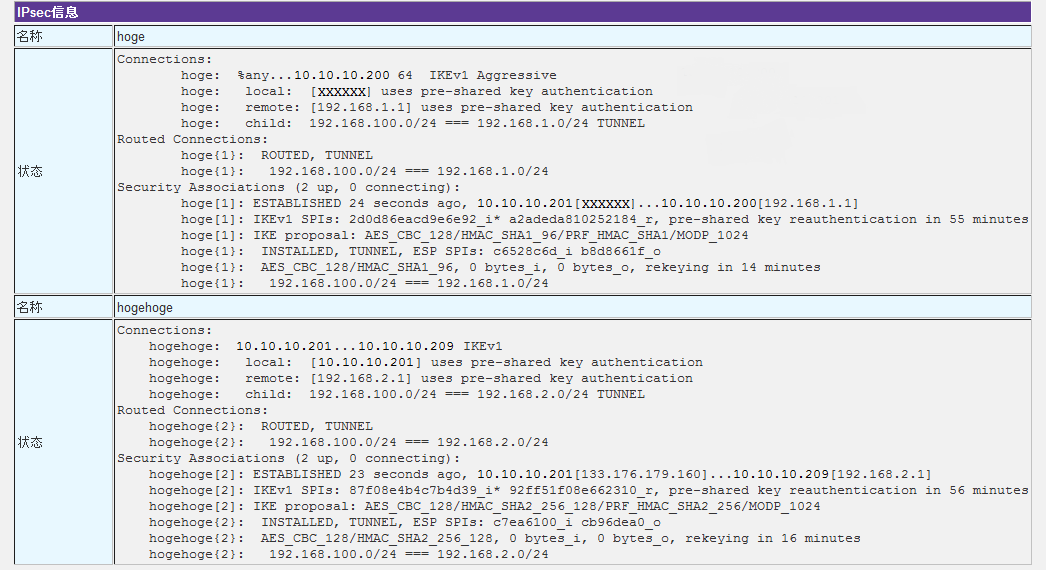
可以在Web设置画面的[系统管理]-[状态]页面上,确认连接状态。
5. 设置示例
用下述构成示例说明使用RTX1200作为连接对象时的设置示例。
5.1. Main mode
构成示例
                      10.0.0.0/24
    ---+--------------------------------------+----
       |.100                                  |.200
    [SGX808]                              [RTX1200]
       |.1   192.168.100.0/24                 |.1   192.168.200.0/24
    ---+-----+-------------               ----+-----+-------------
    	     |                                      |
           [PC1]                                  [PC2]
SGX808
LAN端地址:192.168.100.1
WAN端地址:10.0.0.100
RTX1200
LAN端地址:192.168.200.1
WAN端地址:10.0.0.200
路由器端的设置示例
    -----------
    ip route 192.168.100.0/24 gateway tunnel 1
    ip lan1 address 192.168.200.1/24			...(*4)
    ip lan2 address 10.0.0.200/24			...(*2)
    ip lan2 nat descriptor 1

    tunnel select 1
     ipsec tunnel 1
      ipsec sa policy 1 1 esp aes-cbc sha-hmac		...(*5)
      ipsec ike local address 1 192.168.200.1
      ipsec ike local id 1 192.168.200.1		...(*3)
      ipsec ike backward-compatibility 1 2
      ipsec ike pre-shared-key 1 text test		...(*1)
      ipsec ike remote address 1 10.0.0.100
      ipsec ike send info 1 off
     tunnel enable 1

    nat descriptor type 1 masquerade
    nat descriptor address outer 1 primary
    nat descriptor address inner 1 auto
    nat descriptor masquerade static 1 1 192.168.200.1 udp 500
    nat descriptor masquerade static 1 2 192.168.200.1 esp
    -----------
ip route 192.168.100.0/24 gateway tunnel 1
使用IPsec与目的地LAN进行通讯,所以把该路由设为隧道。
ip lan1 address 192.168.200.1/24
对LAN1和LAN2设置固定地址。
ip lan2 nat descriptor 1
对LAN2接口设置NAT地址伪装。
ipsec tunnel 1
设置执行IPsec定义的应用和自动密钥转换。
ipsec sa policy 1 1 esp aes-cbc sha-hmac
设置针对目的地安全网关的SA策略。
ipsec ike local address 1 192.168.200.1
在local address和id中设置LAN1端的地址,在remote address中设置目的地WAN端地址。
ipsec ike backward-compatibility 1 2
把IKEv1密钥转换类型设为2(新发行)。
ipsec ike send info 1 off
设置不发送IKE的信息有效载荷。
SGX808端的设置示例
名称(Name):
设置适当的名称。
预共享密钥(Pre-Shared-Key):
设置与连接对象相同的Pre-Shared-Key。(路由器端的设置示例(*1))
目的地(Destination):
设置目的地地址。(路由器端的设置示例(*2))
目的地ID(Destination ID):
设置目的地ID。(路由器端的设置示例(*3))
目的地本地地址(Destination Local IP Address):
设置目的地的本地IP地址。(路由器端的设置示例(*4))
目的地本地网络(Destination Local Network):
设置目的地的本地网络地址和子网掩码地址。
来源(Source):
选择"Main mode"。
源IP地址(Source IP Address):
设置WAN端的IP地址。
源ID(Source ID):
无需设置。
认证算法(Authentication Algorithm):
遵从连接对象中设置的算法。(路由器端的设置示例(*5))
加密算法(Encryption Algorithm):
遵从连接对象中设置的算法。(路由器端的设置示例(*5))
5.2. aggressive mode
构成示例
                      10.0.0.0/24
    ---+--------------------------------------+----
       |                                      |.200
    [SGX808]                              [RTX1200]
       |.1   192.168.100.0/24                 |.1   192.168.200.0/24
    ---+-----+-------------               ----+-----+-------------
    	     |                                      |
           [PC1]                                  [PC2]
SGX808
LAN端地址:192.168.100.1
WAN端地址:不固定
RTX1200
LAN端地址:192.168.200.1
WAN端地址:10.0.0.200
路由器端的设置示例
    -----------
    ip route 192.168.100.0/24 gateway tunnel 1
    ip lan1 address 192.168.200.1/24			...(*4)
    ip lan2 address 10.0.0.200/24			...(*2)
    ip lan2 nat descriptor 1

    tunnel select 1
     ipsec tunnel 1
      ipsec sa policy 1 1 esp aes-cbc sha-hmac		...(*5)
      ipsec ike local address 1 192.168.200.1
      ipsec ike local id 1 192.168.200.1		...(*3)
      ipsec ike backward-compatibility 1 2
      ipsec ike payload type 1 3
      ipsec ike pre-shared-key 1 text test		...(*1)
      ipsec ike remote address 1 any
      ipsec ike remote name 1 XXXXXX key-id		...(*6)
      ipsec ike send info 1 off
     tunnel enable 1

    nat descriptor type 1 masquerade
    nat descriptor address outer 1 primary
    nat descriptor address inner 1 auto
    nat descriptor masquerade static 1 1 192.168.200.1 udp 500
    nat descriptor masquerade static 1 2 192.168.200.1 esp
    -----------
ip route 192.168.100.0/24 gateway tunnel 1
使用IPsec与目的地LAN通讯,所以把该路由设为隧道。
ip lan1 address 192.168.200.1/24
对LAN1和LAN2设置固定地址。
ip lan2 nat descriptor 1
对LAN2接口设置NAT地址伪装。
ipsec tunnel 1
设置执行IPsec定义的应用和自动密钥转换。
ipsec sa policy 1 1 esp aes-cbc sha-hmac
设置针对目的地安全网关的SA策略。
ipsec ike backward-compatibility 1 2
把IKEv1密钥转换类型设为2(新发行)。
ipsec ike payload type 1 3
把payload的类型设为3(匹配一部分内置为初始向量(Ⅳ)的生成方法)。
ipsec ike local address 1 192.168.200.1
在local address和id中设置LAN1端的地址。
ipsec ike send info 1 off
设置不发送IKE的信息有效载荷。
SGX808端的设置示例
名称(Name):
设置适当的名称。
预共享密钥(Pre-Shared-Key):
设置与连接对象相同的Pre-Shared-Sey。(路由器端的设置示例(*1))
目的地(Destination):
设置目的地地址。(路由器端的设置示例(*2))
目的地ID(Destination ID):
设置目的地ID。(路由器端的设置示例(*3))
目的地本地地址(Destination Local IP Address):
设置目的地的本地IP地址。(路由器端的设置示例(*4))
目的地本地网络(Destination Local Network):
设置目的地的本地网络地址和子网掩码地址。
来源(Source):
选择"Aggressive mode"。
源IP地址(Source IP Address):
已选择"Aggressive mode",所以无法设置。
源ID(Source ID):
设置与连接对象相同的key-id。(路由器端的设置示例(*6))
认证算法(Authentication Algorithm):
遵从连接对象中设置的算法。(路由器端的设置示例(*5))
加密算法(Encryption Algorithm):
遵从连接对象中设置的算法。(路由器端的设置示例(*5))
5.3. aggressive mode(on PPPoE)
下述是连接对象也需要设置PPPoE时的示例。
构成示例
    ===+================<Internet>============+===
       |                                      |
    [SGX808]                              [RTX1200]
       |.1   192.168.100.0/24                 |.1   192.168.200.0/24
    ---+-----+-------------               ----+-----+-------------
    	     |                                      |
           [PC1]                                  [PC2]
SGX808
LAN端地址:192.168.100.1
WAN端地址:不固定
RTX1200
LAN端地址:192.168.200.1
WAN端地址:不固定
路由器端的设置示例
在IPsec的设置中追加PPPoE的设置。
    -----------
    ip route default gateway pp 1
    ip route 192.168.100.0/24 gateway tunnel 1
    ip lan1 address 192.168.200.1/24			...(*4)

    pp select 1
     pppoe use lan2
     pp auth accept pap chap
     pp auth myname [userID] [PASS]
     ppp lcp mru on 1454
     ppp ipcp ipaddress on
     ppp ipcp msext on
     ppp ccp type none
     ip pp nat descriptor 1
     netvolante-dns hostname host pp 1 xxx.yyy.netvolante.jp	...(*2)
     pp enable 1

    tunnel select 1
     ipsec tunnel 1
      ipsec sa policy 1 1 esp aes-cbc sha-hmac		...(*5)
      ipsec ike local address 1 192.168.200.1
      ipsec ike local id 1 192.168.200.1		...(*3)
      ipsec ike backward-compatibility 1 2
      ipsec ike payload type 1 3
      ipsec ike pre-shared-key 1 text test		...(*1)
      ipsec ike remote address 1 any
      ipsec ike remote name 1 XXXXXX key-id		...(*6)
      ipsec ike send info 1 off
     tunnel enable 1

    nat descriptor type 1 masquerade
    nat descriptor address outer 1 ipcp
    nat descriptor address inner 1 auto
    nat descriptor masquerade static 1 1 192.168.200.1 udp 500
    nat descriptor masquerade static 1 2 192.168.200.1 esp
    -----------
ip route default gateway pp 1
设置默认路由,以及在与目的地LAN的通讯中,使用IPsec时的隧道。
ip lan1 address 192.168.200.1/24
对LAN1设置固定地址。
pp select 1
设置PPPoE。同时注册主机名称。
ip pp nat descriptor 1
对pp接口设置NAT地址伪装。
ipsec tunnel 1
设置执行IPsec定义的应用和自动密钥转换。
ipsec sa policy 1 1 esp aes-cbc sha-hmac
设置针对目的地安全网关的SA策略。
ipsec ike backward-compatibility 1 2
把IKEv1密钥转换类型设为2(新发行)。
ipsec ike payload type 1 3
把payload的类型设为3(匹配一部分内置为初始向量(Ⅳ)的生成方法)。
ipsec ike local address 1 192.168.200.1
在local address和id中设置LAN1端的地址。
ipsec ike send info 1 off
设置不发送IKE的信息有效载荷。
SGX808端的设置示例
省略PPPoE的设置。IPsec的设置与aggressive mode时的设置基本相同。
名称(Name):
设置适当的名称。
预共享密钥(Pre-Shared-Key):
设置与连接对象相同的Pre-Shared-Key。(路由器端的设置示例(*1))
目的地(Destination):
设置目的地的主机名称。(路由器端的设置示例(*2))
目的地ID(Destination ID):
设置目的地ID。(路由器端的设置示例(*3))
目的地本地地址(Destination Local IP Address):
设置目的地的本地IP地址。(路由器端的设置示例(*4))
目的地本地网络(Destination Local Network):
设置目的地的本地网络地址和子网掩码地址。
来源(Source):
选择"Aggressive mode"。
源IP地址(Source IP Address):
已选择"Aggressive mode",所以无法设置。
源ID(Source ID):
设置与连接对象相同的key-id。(路由器端的设置示例(*6))
认证算法(Authentication Algorithm):
遵从连接对象中设置的算法。(路由器端的设置示例(*5))
加密算法(Encryption Algorithm):
遵从连接对象中设置的算法。(路由器端的设置示例(*5))
5.4. NAT Traversal
下述是通过NAT Traversal,连接2台SGX808的IPsec连接示例。
构成示例
    =====+=============<Internet>===========+===
         |                                  |
      [RTX1200_1]                        [RTX1200_2]
         |.1    192.168.10.0/24             |.1   192.168.200.0/24
     ----+-----+---------------         ----+-----+---------------
         |     |                                  |
         |  [SGX808_2]                          [PC3]
         |     |.1   192.168.101.0/24
         |  ---+----+----------------
         |          |
         |        [PC2]
         |
      [SGX808_1]
         |.1   192.168.100.0/24
      ---+----+----------------
              |
            [PC1]
SGX808_1 LAN端地址:192.168.100.1
WAN端地址:不固定(通过DHCP从RTX1200_1分配)
SGX808_2
LAN端地址:192.168.101.1
WAN端地址:不固定(通过DHCP从RTX1200_1分配)
RTX1200_1
LAN端地址:192.168.10.1
WAN端地址:不固定(PPPoE服务器分配)
RTX1200_2
LAN端地址:192.168.200.1
WAN端地址:不固定
路由器端的设置示例
5.3の例に対し、NAT Traversalの設定を追加します。
    -----------
    ip route default gateway pp 1
    ip route 192.168.100.0/24 gateway tunnel 1
    ip route 192.168.101.0/24 gateway tunnel 2
    ip lan1 address 192.168.1.1/24

    pp select 1
     pppoe use lan2
     pp auth accept pap chap
     pp auth myname [userID] [PASS]
     ppp lcp mru on 1454
     ppp ipcp ipaddress on
     ppp ipcp msext on
     ppp ccp type none
     ip pp nat descriptor 1
     netvolante-dns hostname host pp 1 xxx.yyy.netvolante.jp
     pp enable 1

    tunnel select 1
     ipsec tunnel 1
      ipsec sa policy 1 1 esp aes-cbc sha-hmac
      ipsec ike local address 1 192.168.200.1
      ipsec ike local id 1 192.168.200.1
      ipsec ike backward-compatibility 1 2
      ipsec ike nat-traversal 1 on
      ipsec ike payload type 1 3
      ipsec ike pre-shared-key 1 text test
      ipsec ike remote address 1 any
      ipsec ike remote name 1 XXXXXX1 key-id
      ipsec ike send info 1 off
     tunnel enable 1

    tunnel select 2
     ipsec tunnel 2
      ipsec sa policy 2 2 esp aes-cbc sha-hmac
      ipsec ike local address 2 192.168.200.1
      ipsec ike local id 2 192.168.200.1
      ipsec ike backward-compatibility 2 2
      ipsec ike nat-traversal 2 on
      ipsec ike payload type 2 3
      ipsec ike pre-shared-key 2 text test2
      ipsec ike remote address 2 any
      ipsec ike remote name 2 XXXXXX2 key-id
      ipsec ike send info 2 off
     tunnel enable 2

    nat descriptor type 1 masquerade
    nat descriptor address outer 1 ipcp
    nat descriptor address inner 1 auto
    nat descriptor masquerade static 1 1 192.168.200.1 udp 500
    nat descriptor masquerade static 1 2 192.168.200.1 esp
    nat descriptor masquerade static 1 3 192.168.200.1 udp 4500
    -----------
ip route default gateway pp 1
设置默认路由,以及在与目的地LAN的通讯中,使用IPsec时的隧道。
ip lan1 address 192.168.200.1/24
对LAN1设置固定地址。
pp select 1
设置PPPoE。同时注册主机名称。
ip pp nat descriptor 1
对pp接口设置NAT地址伪装。
ipsec tunnel 1
设置执行针对2处的IPsec定义的应用和自动密钥转换。
ipsec sa policy 1 1 esp aes-cbc sha-hmac
设置针对目的地安全网关的SA策略。
ipsec ike backward-compatibility 1 2
把IKEv1密钥转换类型设为2(新发行)。
ipsec ike nat-traversal 1 on
设置使用IPsec NAT Traversal。
ipsec ike payload type 1 3
把payload的类型设为3(匹配一部分内置为初始向量(Ⅳ)的生成方法)。
ipsec ike local address 1 192.168.200.1
在local address和id中设置LAN1端的地址。
ipsec ike send info 1 off
设置不发送IKE的信息有效载荷。
RTX1200_1的设置
无需特别设置。
SGX808的设置
无需对NAT Traversal进行特别设置。
6. 补充
6.1. Rekey
rekey间隔使用下述计算公式。
    rekeytime = lifetime - (margintime + random(0, margintime * rekeyfuzz))

    rekeytime : rekey间隔
    lifetime : IPsec SA的寿命(20分钟)
    margintime : 设备(3分钟)
    rekeyfuzz : 100%
不可更改计算时使用的各个值。这样,rekey间隔为14~17分钟。
6.2. keepalive
如果连接对象使用了Yamaha生产的路由器,那么设置Keepalive功能时的连接方式,只可使用ICMP Echo。
Yamaha Corporation. All right resereved.
[EOF]